


Chapter 5: Match Play
Lesson 1: Match Mechanics

Learning Objectives:
- Identify the conditions required for a legal match start, including robot starting positions.
- Describe Preload requirements before the match begins.
- Describe the mid-match Driver switch requirements and the legal and illegal Driver and Loader actions during a match.
- Describe how a match ends, including stopping at the timer and evaluating "buzzer-beater" scoring attempts.
- Identify how an alliance may legally end a match early.
Every Teamwork Match follows the same arc: robots are placed and set, the timer runs for one minute, the two Drivers on each team switch partway through, and play stops when the timer reaches zero. A Head Referee confirms that each of these moments happens the way the rules require. This lesson walks through that arc in order — the start, the switch, and the finish — and points out where you may need to step in.
Before continuing, read the following from the current Game Manual:
- <SG1> Starting a Match
- <SG5> Each Robot gets one yellow Bean Bag as a Preload
- <GG11> A Team's two Drivers switch Controllers midway through the Match
- <GG12> Don't start before the timer, and stop moving at the end of the Match
- <GG13> Ending a Match early
A Legal Start
Before the timer starts, the Head Referee confirms that both robots are set for a legal start. Rule <SG1> lists the full criteria: the robot fits its starting size, is completely stationary, and matches the configuration it passed inspection with.
At the field, your two live checks are:
- Where each robot is: the robot sits in a legal starting position.
- What it's touching: the robot is not contacting a goal or any scoring object other than its own Preload.
The starting positions are worth calling out, because a first instinct may get them backward.
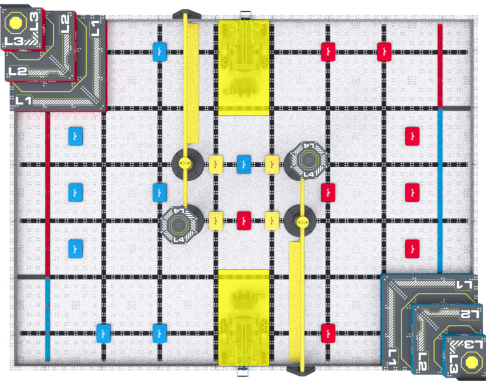
Starting positions are:
- The team listed as Team 1 (the Red Team on Tournament Manager, or listed first in the VEXvia app) starts in the position that shares a wall with the Blue Pyramid Goal (shown on the bottom of the field shown here.)
- The team listed as Team 2 (the Blue Team, or listed second) starts in the position that shares a wall with the Red Pyramid Goal (shown on the top of the field shown here.)
Pro Tip: Look at the color of the Bean Bag directly in front of the robot in its starting position. The color should match the team.
If a robot is in the wrong position, still moving, or touching something it shouldn't, correct it before the timer starts — a short, clear instruction now prevents a dispute later. One related note: if a team raises a concern about how a Field Element or scoring object is set, that concern must come to you before the match under <GG4>, and team members may never adjust anything on the field themselves.
Preloads
Each robot begins the match with one Yellow Bean Bag as its Preload. Under <SG5>, that Preload must contact exactly one robot and nothing else — no Field Elements (other than the Floor), Goals, or other scoring objects.
So the check is simple: each robot has exactly one Yellow Bean Bag, touching only that robot. A missing, wrong-colored, or illegally placed Preload is something to fix before play begins.
The Mid-Match Driver Switch
VEX IQ Teamwork Matches are built around two Drivers per team who share control of one robot. Under <GG11>, the two Drivers must switch controllers partway through the match — between 0:35 and 0:25 on the match timer. The switch is a hard requirement, and it comes with a clear handoff sequence:
- No Driver may operate the robot for more than 35 seconds.
- The second Driver may not touch the controls until the controller is passed to them.
- Once the controller is passed, the first Driver may no longer touch the controls.

As a Head Referee, the switch window is a moment to watch actively. A team that never switches, switches outside the window, or has both Drivers touching the controls at once is in violation of <GG11>.
How a Match Ends
A Teamwork Match ends when the timer reaches 0:00. Under <GG12>, Driver inputs and robot motion may not begin before the timer starts and must stop when it hits zero. At many events a buzzer sounds at 0:00, but if the audio and the display ever disagree, the field timer display is what counts.
The end of a match is where you will most often exercise judgment, because Level Up matches are expected to have last-second "buzzer-beater" attempts. The rule draws the line at the moment the timer shows 0:00:
- If a Bean Bag is released from the robot before 0:00, it is allowed to finish its path, and it scores once it comes to rest — even if it lands after the timer hits zero.
- If a Bean Bag is released after 0:00 (that is, the robot was still moving past zero), it does not count.
When a last-second attempt is genuinely too close to call, teams are given the benefit of the doubt and the score counts. This reflects how scoring is meant to work in VEX IQ: it is not punitive. Many VEX IQ competitors are young and new to competition, and a close call that lands in a team's favor helps keep the experience positive rather than discouraging. When you truly cannot tell, rule for the team.
Ending a Match Early
An Alliance may also choose to end a match before the timer runs out. Under <GG13>, if both teams want to stop early, they signal the Head Referee by stopping all robot motion and placing their Controllers on the ground. You then signal that the match is over and begin tallying the score. Because scoring is evaluated only after robots and scoring objects come to rest, ending early simply moves that evaluation up; it doesn't change how the score is counted.