


Chapter 4: Robot Inspection
Lesson 2: What to Look for During Inspection

Learning Objectives:
- Identify practical techniques to verify checklist items accurately and consistently.
- Check robot size across all legal starting configurations.
- Identify the possible outcomes of an inspection and when a robot must be re-inspected.
- Describe how to communicate inspection results to a team.
Reading the checklist is the easy part. The skill is confirming each item efficiently and the same way every time. The tips below cover the items that take more than a glance.
Before continuing, read the following rules in the current Game Manual:
- <R10> Motors are limited
- <R11> Motors are limited for Subsystem 2
- <R24> A limited amount of custom plastic is allowed
- <R25> Pneumatics are limited
Inspection Tips
A few habits make an inspection faster and more consistent:
- Let the team show you. Ask the team to point out and demonstrate things rather than digging through the robot yourself — it's faster and avoids missing something tucked inside.
- This also offers the team another opportunity to present design ownership. If time allows, let the students explain their robot to you. This can give teams a chance to practice talking about their robot and notebook, but be mindful of the time it takes so that events stay running on time.
- Start with the robot powered on. Having the team turn it on lets you check the firmware version (<R8>) and confirm the power button or battery connection is accessible (<R7>) right away, and it sets up the motor check.
- While you're there, ask whether the robot has any other Brain or microcontroller, and if the event uses Smart Field Control, confirm the Brain is named as the team number with no spaces or dashes.
- To check the firmware version, total wattage, and team number, follow the steps below.
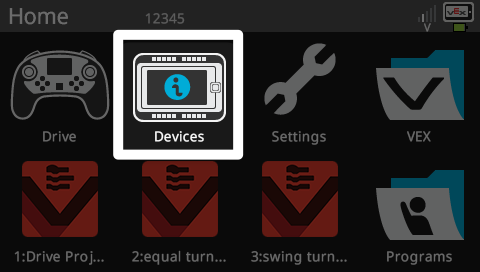
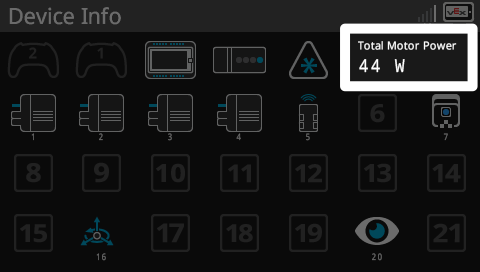
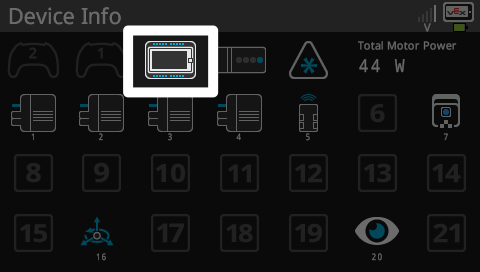
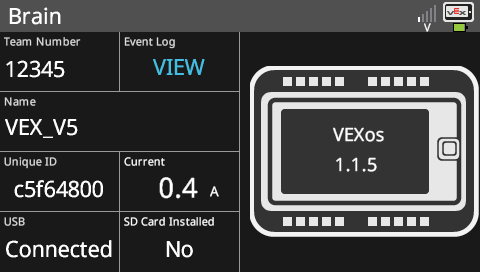
For items that need a closer look during inspection:
- Motors:
- Open the Brain's Device Info to see motors by port (as shown above), then physically check for any that aren't plugged in — those still count toward the 88W combined limit in <R10>.
- For the drivetrain (limited to 55W in <R11>), ask the team to demonstrate what each motor powers. <R11> specifically allows requiring this to confirm a drivetrain motor isn't also driving another mechanism.
- Size and starting configurations:
- Ask how many starting configurations the robot has, and size each one in the sizing tool with the License Plates attached (per <R2> and <R3>). Set the robot the way it actually starts a match and watch for parts that spring out or shift once released.
- Custom plastic:
- Ask the team to point out every piece, since custom plastic can be painted or shaped to blend in, then check the count, size, and thickness against <R24>.
- Pneumatics:
- Locate the air tanks to confirm the count, and read the pressure on the gauge against <R25>.
- Ensure all pneumatic parts are listed on the Legal Parts List.
- Lubricants:
- The robot shouldn't smell like WD-40 or other aerosol lubricants, and nothing greasy should be on it that could transfer to the field (<R19>). If these lubricants can be clearly smelled, seen, or felt, chances are the lubricants are used beyond the “extreme moderation” outlined in the Game Manual.
- License Plates:
- Confirm both are present on opposing sides, a single alliance color (the two colors can't be stacked), white numerals, legible, and matching the registered team number (per <R4>). Plates should not be attached with IQ pins, and you can offer an event spare or guide them to create a legal paper version if a team is missing one.
- Robot Parts:
- Ensure all robot parts are legal for use in the respective competition by comparing the parts to the Legal Parts List.
- Electronics:
- Ensure there are no modified electronics.
Outcomes and Re-Inspection
There are two inspection outcomes: Pass and Partial. A robot passes when every item is met. If an item is not yet met, the outcome is partial. The Partial option marks a robot that is being re-checked rather than one going through inspection for the first time. The team makes the needed change(s) and returns for re-inspection. The robot only competes once it passes.
Re-inspections also occur after a significant change such as a Subsystem swap (per <R2>a), or when a new starting configuration is added (per <R2>b).
Communicating Results
When a robot does not yet pass, tell the team plainly which item is not yet met and point to the specific rule. Be clear about what needs to change and that the robot must return to pass before competing. Not passing on the first try is a normal part of the process — keep the communication direct and supportive, with the goal of helping the team reach a legal robot.