


Ready for Takeoff: Introducing VEX AIR
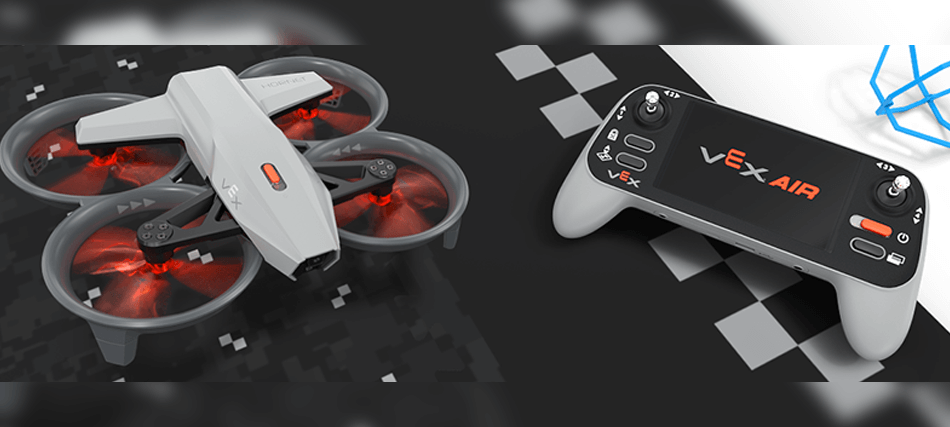
Ready to make flight part of your VEX experience? VEX AIR brings the world of drones into the VEX ecosystem, introducing students to a new dimension of STEM learning. Whether flying virtually in the VEX AIR Flight Simulator or taking flight with the real VEX AIR Drone, students gain hands-on experience that builds coordination, control, and critical thinking. Each flight is a chance to test ideas, refine skills, and bring teamwork to life.
Modules Enable Interactive Flight
One thing that makes VEX AIR stand out is how it moves beyond flight to interaction. The drone’s three interchangeable modules let students pick up, carry, and drop objects as part of their missions, introducing new layers of challenge and purpose to every flight.
- Magnet Module – Picks up and carries magnetic objects during missions.
- Motorized Hook Module – Raises or lowers a powered hook for precise cargo movement.
- Passive Hook Module – Hangs freely for simple lifts and drops.

These modules transform the drone into a problem-solving tool. Students learn not just to fly but to accomplish tasks that require planning, precision, and teamwork. In the VEX AIR Drone Competition (VADC), teams put these skills to the test—working together to transport and place objects accurately while managing flight paths and strategy.
Safety by Design
Safety is central to every part of VEX AIR. The Propeller Lock feature keeps the propellers securely locked when powered off, preventing movement during handling, setup, or between flights. It’s an essential safeguard that helps students and educators feel confident as they work with the drone. The Propeller Lock will activate automatically when the drone detects handling.
Combined with a durable frame and balanced design, VEX AIR offers smooth, stable flight performance that supports precise control and dependable handling, ideal for first-time pilots and advanced flyers alike.
Train Virtually, Fly Confidently
Before flying the real drone, students can train in the VEX AIR Flight Simulator, built directly into VEXcode AIR. The simulator mirrors real-world controls, allowing students to practice using their physical VEX AIR Drone Controller in a safe, virtual environment.
VEX AIR Flight Simulator features include:
- Two field layouts: Rings for flight fundamentals and Competition for mission-based practice.
- Six camera views: Pilot, Forward, Downward, Chase, and two Split Screen options.
- Built-in scoring tools to track rings flown through and successful drops.
This immersive training helps students develop muscle memory, spatial awareness, and control before ever taking off in the real world. For educators, it ensures students are flight-ready and safety-conscious from their very first mission. Flight simulators are an important part of real-world pilot training, and that connection is made here as well. The VEX AIR Flight Simulator offers students the opportunity to practice, explore settings, and explore different pilot perspectives without ever leaving the ground.
VEX AIR Support

VEX Library for VEX AIR
The AIR Section of the VEX Library offers a wealth of information to help educators and students get started and learn about their drone, controller, and VEXcode AIR. From step-by-step guides for updating firmware or connecting a drone and controller, to information about the Propeller Lock, using modules, or capturing images during flight, the VEX Library is a key resource from take off to landing. Explore the AIR Section of the VEX Library to learn more.

VEX AIR API
The VEXcode API Reference offers support for coding the drone in both Blocks and Python. The API is built right into VEXcode AIR, serving as both a coding reference and a source of in-context help, making it easy for students to explore commands, understand what they do, and use them to control every aspect of flight. Many commands include examples, so students can build and test projects to see commands in action for themselves. Explore the VEX AIR API to learn more.
VEX AIR Courses
Curricular resources are coming soon as well. Three courses will guide students from the basics of simulator training to learn the principles of flight and control in a virtual environment, to hands-on piloting with the controller, and finally to coding fully autonomous drone missions that bring real-world automation to life. Courses will include built-in teacher notes, standards alignment, and the educator support common to curricular resources across the VEX Continuum. Explore VEX AIR Courses to learn more.

Taking Flight Together
From simulator to sky, VEX AIR transforms curiosity into capability. It challenges students to fly with purpose, think strategically, and collaborate as part of a team. Whether coding an autonomous mission or competing to score the most points, VEX AIR connects learning and innovation—one flight at a time.
Learn more about VEX AIR and explore how your students can take flight at vexrobotics.com/air.
Book a 1-on-1 Session to learn more about how VEX AIR can fit into your setting.