Making the Most of Task Cards with VEX AIM
Picture This Scenario...
Around a classroom, small groups of students are gathered around a field with their VEX AIM Coding Robots. They are all working on the same task, but some are driving with the One Stick Controller while their partner takes notes, others are moving the robot by hand and developing a strategy, one group is sharing a plan with the teacher, and another is beginning to code the robot. While all at different stages of the challenge, a common thread is that all students are regularly referencing and writing on their task cards. The teacher wraps up her conversation and looks at the checklists on students’ task cards to get a glimpse of who might be ready for a check-in without interrupting the group’s conversation.
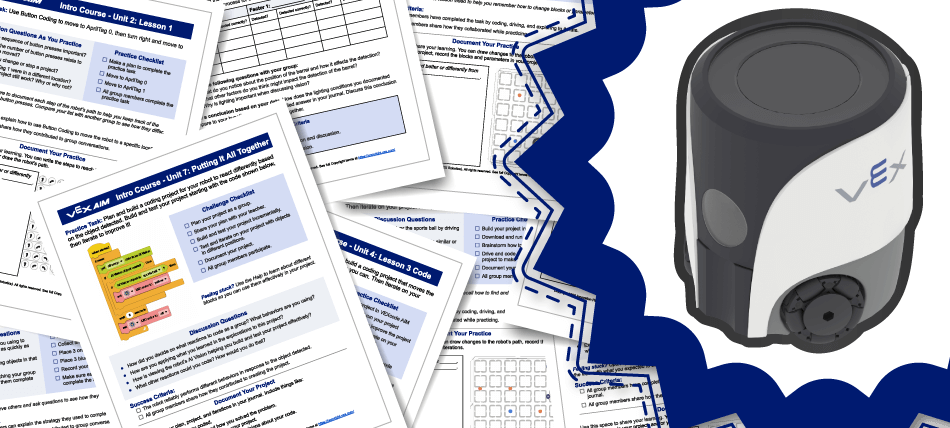
At the core of lessons in the VEX AIM Intro Course is hands-on learning with the robot, and moving between driving and coding to develop both physical and computational models of the task at hand. The task cards provided in the lessons offer teachers and students a tool to support that engagement and learning in a tangible way. This article will offer some ideas for ways that task cards can support communication, meaningful student discussion, student autonomy and problem solving, and help build documentation skills.
What is a task card?
The task card is a metacognitive tool designed to help students monitor and communicate their progress and learning with you, and with each other. Giving each student a task card fosters student autonomy throughout their practice, as they can use the task card to keep track of where they are with the task, engage in thoughtful collaborative discussion with their group, and document their learning. As the teacher, you can use students' task cards to help guide your interactions with them, looking to see which parts of the task they have completed so far, talking about documentation, or checking in to see if they have met the success criteria.
Task cards are designed for individual student interactive use. This means that each student should have their own task card, and should be able to write on it in some way, either on a physical copy or digitally, as best meets their needs. That way, each student can use the task card in the way that helps them make sense of the task at hand. Individual students may document the same task differently, and that is a great learning opportunity to share how they are understanding the task, or creating a mental model of an activity. To learn more about the anatomy of a task card, and the logistics of using them in your classroom, read this article.

Task Cards are adaptable
Task cards are not a one-size-fits-all means of teaching – they are a tangible tool that students can use to build their metacognitive and collaboration skills. The Universal Design for Learning (UDL) Guidelines are embedded within the AIM Intro Course, with the goal of promoting authentic and resourceful learner agency that is purposeful, strategic, and action-oriented. Task cards enable students to share their learning in variable ways. Offering multiple mediums of expression - verbal, written, physical, drawn, etc. - gives students the opportunity to choose how to communicate so they can best express their thinking. Giving students voice and choice in their learning and the expression of that learning is important to ensure that all learners are successful.
Task cards are also fully editable (through Google Docs or Microsoft Word), so you can tailor them to meet your students’ needs, calling more or less attention to different elements as you see fit. This allows for easy differentiation for different learners, as not all students may need the same prompts or focus on a task card. Editing a task card enables you to offer targeted support for students who need it, while the class as a whole works on the challenge. For instance, the Practice Checklist could be made more specific or include different items to focus students’ attention; the Discussion Questions can be simplified to guide student discussion along a particular path; or the Practice Task or Success Criteria can be adjusted to tailor the challenge to a specific group’s needs.
Task Cards foster meaningful student discussion
Collaborative learning is at the core of how students engage and learn with VEX. However, leaving students to their own devices and expecting them to self-organize that collaboration, or know how to engage in relevant, meaningful discussions on their own isn’t necessarily a reasonable expectation. We know that we want students to engage with one another on a deeper level as they make sense of what they are doing and learning, so giving students prompts and scaffolds to support that skill development.
The Discussion Questions on a task card are meant to help students move from simply talking about if they completed the task or not at a surface level, to going deeper into how they completed the task or why they completed it in a particular way. By giving students prompts for discussion in this way, they can practice communication skills in a low pressure environment within their groups.

To Return To Our Scenario…
There is lively conversation happening all around the room as students are working. In one group, students are actively gesturing and moving the robot to share different ways to complete the challenge. In another, there is a vote happening to determine one strategy to start with. A different group is verbalizing and listing behaviors, and in other areas of the room the teacher hears students continually asking “Why?” or “Can you explain your thinking?” or using language like “This is what I hear you saying,” or “To add onto that idea”. The teacher knows the questions on the task card, and based on what she overhears as she moves around the room, can tell that students are staying on task. She joins the group who just voted to check-in with them and learn more about their plan.
Task Cards facilitate teacher check-ins
Circulating around the room as student groups engage in different stages of a challenge can seem daunting at first. Multiple groups may be vying for attention, and it can be hard to tell who is where, or how to ensure that the squeaky wheels aren’t the only ones you’re working with. The task cards offer a tangible, visible tool to make it easier to move around the room, glance at a task card, and have an idea of if and when a group is ready to check-in. The Practice Checklist is a quick resource to see how far along a challenge a group is, and the documentation portion can give you an entry point to your conversation.

Getting students into the habit of using the task cards and being conscientious with the checklist and documentation can make check-ins much smoother for everyone. Students won’t be interrupted unnecessarily, they have a tool to ask questions, and you can determine who to check in with and why more easily.
Let’s Think About Our Scenario Once Again…
After leaving one group, the teacher scans the room to see who to check in with next. Glancing down at the task cards on their tables, she notices who has several items checked off and recognizes one group where one student has only the first item checked and another is down to the fourth. She stops to ask about why that is, and to see if they need help coming to consensus. Quickly it becomes clear that this group needs some support with how to document each strategy in order to collaborate and move forward. The teacher helps them to decide on documenting three things about a strategy - the path, a short list of behaviors, and a reason for why it would be successful. She then moves on to the group beside them, who have just checked off their planning step and asks if they’re ready to share a plan.
Task Cards promote student autonomy and problem solving
Learning how to effectively collaborate and communicate with peers is an ongoing evolution for students. We can establish ‘best practices’ and review expectations, and give strategies for turn taking and decision making, but these skills take time and practice to develop. The task cards are designed to offer students ways to practice these skills and goals for their collaboration.

Collaboration is baked into the Success Criteria explicitly to ensure not only that students work together to complete the task at hand, but that they are also able to articulate how each person contributed. Again, this isn’t meant to be something that students get ‘perfect’ right away, but instead a criteria that they can be successful with while still improving their collaboration and communication skills. At the start of the course this might be as simple as turn taking without arguing, but as they progress, this can become more nuanced - where students cite their discussions and not just what they did but how sharing their thinking contributed to the group’s success.
Additionally, features like the Feeling Stuck suggestion gives students something (besides asking the teacher) to do if they are at an impasse. These rely heavily on peer feedback and discussion, again to get at the collaborative learning component of the lessons and challenges. The goal is to give students opportunities and options to problem solve with growing independence, which again, will grow over time.
Thinking About Our Classroom Scenario…
The teacher pauses for a moment after quickly wrapping up with one group, and reflects on how much more frequently she sees students looking to one another for help than she used to. She makes a note to bring this up during their Wrap Up Discussion, so the students can see their progress as well as she does. She sees two groups part ways, and walks over to ask them what they learned from seeking help. They share that they had a great discussion, and that the group who sought help were missing one crucial step in their plan - which they couldn’t see until they watched a totally different strategy. When she checks in about Success Criteria with this group later on, one student shares how the other suggested looking at other ideas rather than spinning their wheels together, and how that helped him to pause and be open to a different perspective.
Task Cards introduce documentation strategies and practices
We know that we want students to document their learning and sense-making, and for good reason, but establishing how to do that can be challenging. We’ve all seen beautiful notebooks but rarely do we see the trajectory that got students to that point. The documentation prompts and spaces on the bottom of the task card offer students actual documentation strategies to help them identify not only what to document, but, and perhaps more importantly, how to document.

Designed to supplement students’ journals, the task cards offer a starting point for students to develop their own documentation strategies. They can combine sketching with writing, use images or screenshots of code, or draw the path of the robot and list the behaviors, and much more in order to make their documentation work best for them. Rather than being a worksheet style ‘one size fits all’ model, instead this is meant to help give students an idea, and over time, have them explore different ways to document to find their own style.
Returning To Our Scenario…
After their Wrap Up Discussion, the teacher asks students to bring their task cards and journal documentation up to the board, and displays them all. She asks what the first thing they notice about their documentation is, and one student immediately comments “They’re so different!”. While all students were documenting the same task, the way each documented was not. She pointed out two task cards and asked their owners to explain them to the class. She then asked for volunteers to share what they did similarly, or differently, and why. The students engaged in a great discussion about what strategies they’ve found that work well for them, and some even noted ideas they wanted to try in the next class.
Share how task cards support your classroom in the PD+ Community. Want to learn more about making the most of task cards with your students? Schedule a 1-on-1 Session for personalized planning support.