


Simulated Flight – Real-World Learning
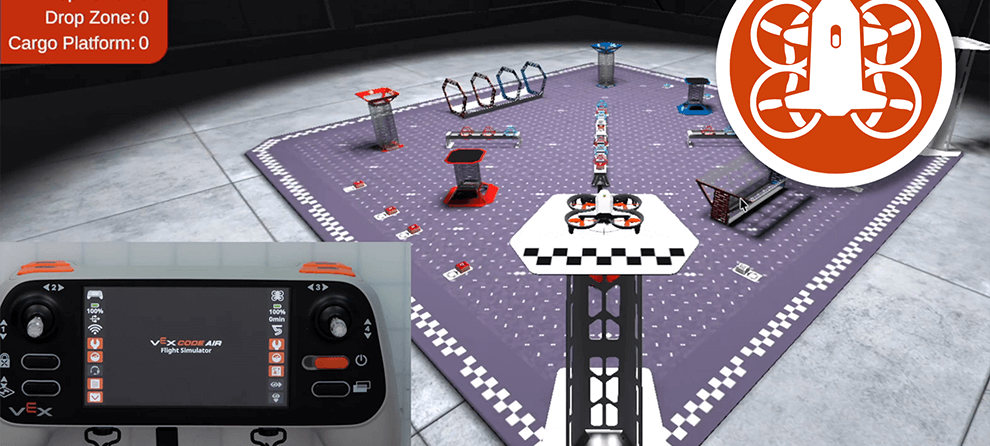
When learning a new skill, it is common to practice in a safe, low-stakes environment. This is especially true for things like learning to fly. Before taking to the skies with any aircraft, professional pilots spend countless hours in simulator training. Learning how controls work for the first time in a virtual environment helps pilots stay focused on the task at hand, and gives them space and time to learn, practice, and build skills without having to worry about environmental factors or other distractions. When thinking about how to introduce drones in an indoor learning environment, we wanted to offer students the same opportunity for skill development in a safe way. That is why the VEX AIR Flight Simulator was created.
What is the VEX AIR Flight Simulator?
The VEX AIR Flight Simulator in VEXcode AIR allows students to practice flying a VEX AIR Drone in a safe, virtual environment. Students connect their physical VEX AIR Drone Controller to VEXcode AIR, and use the default fly project to control the virtual drone, just as they would the physical drone. The purpose of the simulator is to give students a training space, so they can build comfort and confidence in their piloting skills before their first physical flight.

Learn to Fly with the Default Fly Project

The virtual drone responds to the same controller inputs and settings as the physical drone. From takeoff to landing, all controls and settings that are part of the default fly project for the VEX AIR Drone function the same way in the simulator. This offers students a completely realistic experience of flight control, with the added feature of being in a virtual environment, with unlimited battery life. Students can take their time in the simulator without external pressures. They are free to spend the time, focus, and attention they need to learn how to control the drone precisely and comfortably. Learn more about the default fly project in this article.
Build Safety Practices from Day 1
Part of using the simulator is establishing routines and practices around flight. Safety procedures, like engaging and disengaging the Propeller Lock, are an integral part of flying with VEX AIR, and as such are built into the simulator so that students can begin building a solid foundation of flight controls and safety from day one.
Before flying, students disengage the Propeller Lock by selecting the power button on the virtual drone, just as they would press the power button on the physical drone.
Learn more about using the VEX AIR Flight Simulator in this article.

Camera Views
The simulator features a variety of camera views as well, that students can use as they fly, offering different perspectives on their drone’s position in space. The camera views mimic the ways you could see the physical drone in real life, and incorporate the front and down camera views from the drone itself. Having camera options helps students develop their understanding of the connection between controls and drone movement in space. Camera views, as shown in the video below, include:
- Pilot View - Shows the drone from the pilot’s position outside the field, just like in a competition. This view helps build spatial awareness and practice line-of-sight flying.
- Front Camera - Displays the forward-facing camera (matching the drone's forward camera) to show what the drone “sees” straight ahead. It’s useful for navigating through obstacles or lining up with targets.
- Down Camera - Displays the downward-facing camera view (matching the drone’s own downward camera.) This is useful for aligning with objects and scoring elements.
- Chase View - Follows behind the drone as it moves. This view gives a dynamic perspective that helps visualize flight paths and direction changes.
- Split Screen 1 - Combines Chase View on the top and Front Camera on the bottom.
- Split Screen 2 - Combines Chase View on the top and Down Camera on the bottom.
Multiple Layouts Help Develop Pilot Skills
The different layouts in the simulator offer opportunities to learn and practice different skills in an intentional way. Students begin in the Rings layout, where suspended rings hang at various heights and angles to help students learn about how joystick controls move the drone. Students begin with flying through one or two rings at a time, to learn about pitch, roll, yaw, and throttle individually. As their skills grow, combinations of rings create flight paths where combining joystick controls is required. Through repeated practice, students learn how to move from sequential single-axis movements to smoother multi-axis maneuvers.


Metrics in the simulator count the number of rings the drone has flown through, as well as the number of collisions the drone has made during its flight. These counts give students important data to track their progress, as they learn how to fly in collision-free paths.
The Competition layout is designed to level up students’ piloting skills even further, as they fly the virtual drone and interact with objects in its environment. Students use one of two modules attached to the base of the drone to engage with game elements to pick them up from the field and deliver them to various scoring locations.
- The Magnet Module uses a magnet to pick up magnetized cargo objects. Students use a controller button to disengage the cargo from the magnet, to release the object onto a Cargo Platform.
- The Motorized Hook Module uses a mechanized hook to pick up orbit balls. Students use controller buttons to lower the hook in order to hold the payload, and raise the hook to release the payload in any of the Drop Towers, Poles, or Drop Zone.
Using the modules requires complex maneuvers to be able to accurately and reliably pick up and drop objects on target. Metrics in the Competition layout count how many objects have been scored in the various locations on the field, giving students useful data to help improve their skills.


Virtual Flight Course Scaffolds Learning in the Simulator
The VEX AIR Virtual Flight Course, the first course in the curricular sequence for VEX AIR, uses the simulator exclusively to teach students how to control the drone. The course scaffolds student skills from the basics of flying with single joystick inputs, to combining multi-axis controls into more complex maneuvers, to using the modules and interacting with objects. Through video-based instruction and flying practice missions, students learn about all of the different controls and settings on the controller through the simulator.
As students complete their missions in the simulator, they log each and every flight they take in a Mission Log, like the example shown here. Missions grow in complexity over time, so that students fly in increasingly challenging flight paths, participate in timed challenges, and practice precision flying to be successful. By the end of the course, students will have accumulated a series of Mission Logs, and use them to calculate their total number of practice flights and total flight time in the simulator.
Through each mission completed in the course, students are building their understanding of how it feels to fly the drone, so that when it comes time for physical flight, they are well prepared and confident in their skills. Part of the beauty of the simulator is that students can return to at any time – even when they are working on flying the physical drone. The simulator is always available for practice and testing, so students can continually develop their skills.

The Simulator Offers Teachers Piece of Mind
Students are going to be excited about flying, as they should be! However, many educators may be nervous about students taking off immediately. The simulator offers a way to channel students’ enthusiasm in a productive way, while balancing safety concerns for educators. Using the simulator and the Virtual Flight Course offers teachers a way to develop students' piloting skills in a safe, virtual space – without fear of damage to the drone or safety issues in an indoor setting. The simulator gives students and teachers a platform for a fast-feedback cycle, allowing them to learn from mistakes in a low-stakes environment. No one is learning on the fly, but students are instead learning through repeated, persistent, thoughtful, and intentional practice, without the distraction or fear of damage or safety. Mission Logs offer teachers a tool for helping students be reflective about their flights, and guide student practice to take flying seriously, while still being an engaging experience.
During several recent conferences, the VEX AIR Flight Simulator was available for demonstration, so that attendees could try flying first-hand. The response to the simulator was overwhelmingly positive, with teachers sharing how helpful this would be with their students. Not only could they see themselves using the simulator with students to learn about basic flight controls, many commented on how much fun they were having as well! Teachers shared how responsive the controls were, and how seeing students successfully fly in the simulator would make them much more comfortable letting them fly a physical drone. Combined with the course resources like Mission Logs, teachers clearly saw the bigger picture of creating an immersive, intentional, interactive learning experience with the simulator.
Comfort and confidence with drones does not come overnight for most students, or their teachers. Tools like the VEX AIR Flight Simulator offer a safe space for skill building. Not only are students learning concepts and controls, they are also building perseverance, patience, and problem-solving skills in a safe, low-stakes environment. The simulator provides a place for experimentation, practice, iteration, exploration, learning from mistakes, and taking chances through meaningful learning experiences and challenging missions. Students may be flying in a simulator, but their learning is happening in the real world.
To learn more about purchasing VEX AIR, visit air.vex.com. Schedule a 1-on-1 Session to talk more about how VEX AIR can fit into your setting.